
✦Free forever — no credit card
Give your team a page
customers can book.
Every person on your team gets a public profile card at your own address, with a live list of the times they are actually free. A customer opens it, picks a slot, types their name — and a real meeting appears on your calendar with the invitation already in their inbox. No account for them. No back-and-forth for you.
Free forever — not a trial. No credit card.
01The problem
Finding a time costs more than the meeting
Six emails to book thirty minutes
You offer three times. Two are gone by the time they reply. They offer three back, one of which you are already booked for. The meeting that mattered is now next week.
Your salesperson's calendar is invisible
A customer who is ready to talk has no idea when that is possible. So they wait for a call that comes at a bad moment, or they stop waiting.
The confirmed slot was already taken
Someone books you from an outside tool that cannot see your real calendar. Now two people expect you at 11:00, and one of them finds out at 11:00.
Nobody knows who to ask for
A visitor lands on your website with a specific question and no way to see which person answers it — so it goes to a shared inbox and waits its turn.
A scheduling subscription per seat
Twelve people who take customer meetings means twelve paid seats on a tool that does one thing, and none of it lands in the system you actually run on.
02The public card
A page per person, and a directory for the team
The profile card
Each published employee gets a public page at /your-company/team/employee-number — their name, job title, department and photo, the links they chose to show, and a Save-contact button that drops a vCard straight into the visitor's phone. If booking is on, the booking panel sits right there on the same page, and ?book=1 at the end of the link opens directly on it — that is the one link a salesperson pastes into a signature or a WhatsApp reply.
The team directory
At /your-company/team a visitor sees every person your company chose to publish, with the bookable ones listed first so the shortest path is the top of the page. Only employees you explicitly flagged appear, and only active ones. The directory sends no email addresses, no phone numbers and no user ids to the browser — a public page must not double as a staff-list export.
One calendar for the whole team
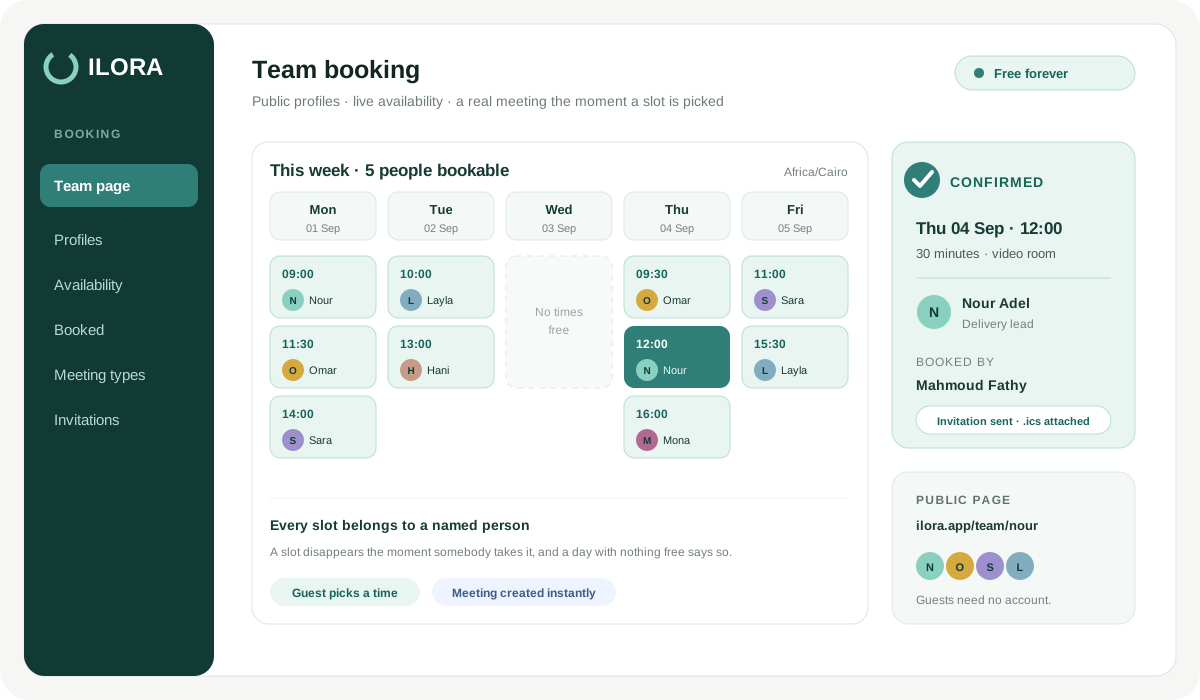
There is also a single company link — /your-company/team/calendar — that merges every bookable person into one day-by-day view. A visitor picks a time first and sees whose it is beside it, instead of opening one profile after another to find somebody free. Every slot still belongs to a named person and books through that person's calendar, with the same notice period and the same limits.
03What the visitor does
Three screens, no sign-up
Pick a day
A strip of the days that actually have room. Days with nothing free are simply not there — the visitor never taps into an empty screen.
Pick a time
The free times for that day, in the timezone the page states out loud. The page reads Arabic or English from the visitor's own browser.
Name, email, confirm
Phone and a short note are optional. On confirm they get the meeting details and the join link by email, and a confirmation card on screen.
The slot list is not a form of words — it is computed. ILORA walks the working window of each day in the employee's own timezone, steps through it slot by slot, and drops anything that overlaps something already busy: a meeting that person is hosting in ILORA and is still scheduled or active, and any booking already confirmed on their profile. A slot the customer can see is a slot the customer can have.
04Under the employee's control
Their page, their hours, their rules
Meeting length
15, 30, 45, 60 or 90 minutes. The working window is cut into slots of exactly that size, and 30 minutes is the default if nobody chooses.
Working hours
A start and an end time. Out of the box the window is 10:00 to 18:00, and no slot is ever generated outside it.
Working days
Any set of weekdays. The default is Sunday to Thursday — the week most of our customers in Egypt and Libya work — and every person can change it to their own.
How far ahead
7, 14, 30 or 60 days of horizon, defaulting to 14. Past the horizon there is nothing to book, so next quarter stays yours to plan.
Timezone
Set per person, and it falls back to the company timezone when they leave it alone. The visitor is told which timezone the times are in before they pick.
Published or not
Two separate switches: one publishes the profile, one opens booking on it. Turn the profile off and both go dark in the same moment.
05Rolling it out
Publish a whole department in one action
Nobody wants to open forty employee records to launch a booking page. HR picks a department — or an explicit list of people — flips public profiles on, switches booking on in the same call, and gets back the number of employees actually changed. Only active employees are touched.
A team is a department
The same operating unit HR already manages — no second grouping to maintain, and no list to keep in sync as people move.
Booking implies a profile
The booking panel lives on the profile page, so booking without a published profile would be unreachable. Ask for booking and you get both.
One switch to close it
Turning the profile off turns booking off with it, for the same reason. There is no state where a page is hidden but still taking meetings.
06Why it is safe to publish
A public form on the internet needs limits. Here are ours.
2 hours of minimum notice
The earliest bookable slot is always at least two hours from the moment the page is loaded, on every profile. It is a floor in the engine, not a setting someone can lower to zero — so a stranger cannot put a meeting inside your next two hours.
3 per visitor, 10 per address
Counted over the last 24 hours: one visitor email can book the same person at most 3 times a day, and one visitor IP address at most 10 times a day across your entire company. Past either line the request is refused. The caps are plain database counters, so they hold under load.
One slot, one winner
The booking row is claimed before the meeting is created, and a unique index rejects a second write on the same start time. The visitor who lost the race is told the slot is gone and handed a refreshed list — instead of both of them arriving at 11:00.
Only what you published
An employee appears on a public page only when you flagged that specific person, and only while they are active. The payload carries no email, no phone number and no user id. Notes and phone numbers a visitor types stay inside the meeting, never on the public page.
Bounded by design
A horizon over 60 days falls back to 14. A meeting length outside 10–240 minutes falls back to 30. One request returns at most 14 days of slots. Nothing on the public surface is unbounded, so nothing on it can be used as a lever.
A real meeting, not a note
A confirmed booking creates an actual ILORA meeting with the visitor invited by email — the invitation and the join link land in their inbox, and the appointment sits in your meetings like any other. From there you run it exactly as you would one you booked yourself.
07What it costs
Free on the Meetings tier, and it stays free
What you get today, free
Public booking has no tier of its own — it runs on the meetings module, so signing up here activates your workspace on the free Meetings tier immediately. That gives you the public profile cards, the team directory, the booking panel, the slot engine and the meetings the bookings turn into. Free forever, not a trial, and no credit card is asked for.
When you grow into the rest
The booking pages are one door into a full platform — sales, people, finance, projects and communication. When a booked call turns into a customer you want tracked, or a booked interview into a hire you want onboarded, you open the rest of it from the same workspace with the meetings and the people already in it. What each plan includes is on the pricing page.
08Who it fits
Anyone whose calendar a customer needs to see
Sales teams
One booking link per rep, in the signature and in the WhatsApp reply. The ready buyer picks a time instead of waiting for a callback.
Consultants & agencies
A public card that carries the person, not just the company — the credibility and the calendar on one page.
Recruiters
Send a candidate the link and let them choose the interview slot. Their choice lands on the real calendar of the real interviewer.
Account & support managers
Give named clients a way to reach their named person on purpose, at a time that exists, instead of a queue.
Shipping & logistics
A rate conversation or a contract review, booked with the branch person who owns the account.
Labs & clinics
A consultation with a specific specialist, in their working window, without a phone call to arrange the phone call.
09FAQ
Questions and answers
Is the booking page really free?
Does the visitor need an account to book?
Can a booking land on top of a meeting I already have?
What if two visitors pick the same slot at the same moment?
Can someone book me for 20 minutes from now?
How far ahead can people book?
What stops someone spamming the booking form?
Do I have to publish everyone in the company?
We work Monday to Friday, not Sunday to Thursday.
What actually happens when a visitor confirms?
Can I publish a whole department at once?
What happens when we outgrow the free tier?
Stop offering times. Start getting booked.
Free forever on the Meetings tier. No credit card.
Start free now