Your own domain
The room lives on your ILORA address, in the browser. No download for you, no download for the person you invited.

✦Free forever — no credit card
Host the call on your own domain, in the browser. It transcribes itself and hands you the summary with the action items and who owns each one — in Arabic or in English. Nobody takes notes, and nobody argues later about what was agreed.
Free forever — not a trial. No credit card.
01The problem
Everyone was talking, so everyone assumed somebody else was writing. Two days later the decision exists only in five different memories, and no two of them match.
The question that costs a week. The work restarts from the last thing anyone can remember, and the part that mattered is the part nobody wrote down.
Four things came out of the call. All four were “we should…”. None of them had a name attached, so none of them moved.
You send an invitation into a void. Half the room shows up, half of it forgot, and you find out at the top of the hour.
One key person could not attend. There is nothing to send them — so they get a five-minute verbal recap that leaves out the reasoning.
One subscription for the video, another for the recording, a third for the AI notes, a fourth for the booking link. Four tools that do not know about each other.
02Automatic
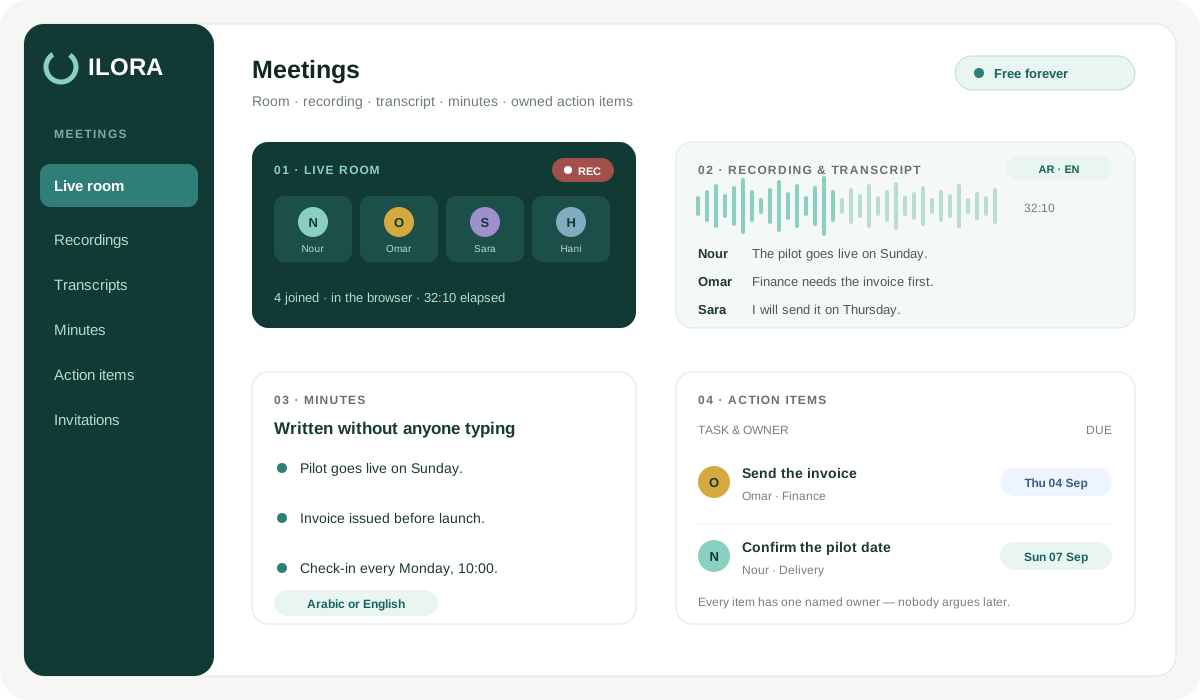
Four steps, and you press exactly none of them. By the time you close the tab, the record of the meeting already exists.
Recording is available on paid plans. The room records to your organization's storage — you can start it by hand, or have it start on its own the moment the meeting opens.
Speech becomes text in the language it was spoken in. Arabic stays Arabic. English stays English.
Minutes you can actually send: what was discussed, what was decided, and what is still open — not a wall of transcript.
Action items come out as a list with a name against each one, taken from what people actually committed to in the room.
The person who missed the meeting gets the full minutes. Not a verbal recap that drops the reasoning.
03Before the meeting
The email carries an .ics attachment, so it lands in whatever calendar the other side already uses — one click, no account, no download.
Accepted, tentative, declined. You see the answer next to each name instead of guessing from an inbox, and you can chase only the people who never replied.
Reschedule and every invitee is notified automatically with the new time. No group message, no “did everyone see the change?”
The people you invite join from the link. They never take one of your three free seats, and they never need an account.
Items written before the call, visible to everyone in the room, so the meeting has a shape before it starts.
Quick meeting opens a room immediately and copies the invite link to your clipboard. Paste it wherever the conversation is already happening.
04One to many
Turn any meeting into a webinar and the room changes shape: you present, they listen. Included on the free tier — it is not a bolt-on.
Everyone who is not a host joins without a microphone or a camera. No background noise, no accidental unmute, no scramble to find who is making that sound.
Collect the details of the people attending before they reach the room, so you know who came and how to follow up afterwards.
Attendees wait in a branded lobby with your logo until the host starts. Nobody sits in an empty room wondering whether they got the time wrong.
The session summarizes like any other meeting — so a webinar leaves behind minutes you can send, and a recording too if your plan records.
05What is actually included
Most free video tiers are a countdown timer with a logo on it. This one is the meetings app we sell, with limits on volume rather than holes cut in the features.
The room lives on your ILORA address, in the browser. No download for you, no download for the person you invited.
Recording is available on paid plans. Every finished recording can be opened as a public share link — a client watches it without an account and without joining your organization.
Transcript and summary in the language of the room. An Arabic meeting produces Arabic minutes, not a translation of English ones.
The AI writes the first draft. You correct the one line it got wrong and send it — because a document nobody can fix is a document nobody trusts.
06Let them book you
Stop trading six messages to find a time. Share one link, the other side picks from what you are genuinely free for, and the meeting exists — with the invitation and the minutes already wired to it.
07The honest lines
We would rather you read the limits here than discover them in the middle of a call.
Meetings Free grants the meetings app and nothing else — the other apps are not silently switched on and are not silently billed. What paid plans cost is on the pricing page.
08FAQ
Free forever. No credit card. Nothing to install.
Start free now